Secure tunnel for local and staging tests
A free, open-source secure proxy that lets you run Selenium, Cypress, Playwright, Puppeteer and Appium tests against localhost, staging servers or any environment behind a firewall or VPN. No IP whitelisting required.
- v4.8
- Open Source
- Free for every plan
- Java 11+
java -jar testingbot-tunnel.jar TESTINGBOT_KEY TESTINGBOT_SECRET
bash
- Released
- 2026-05-19
- License
- MIT
- SHA1
-
31c2552b42ecc3642d90c398935255bd6abacbf3 - Maven
-
com.testingbot:TestingBotTunnel:4.8 - Docker
-
docker pull testingbot/tunnel
What is TestingBot Tunnel?
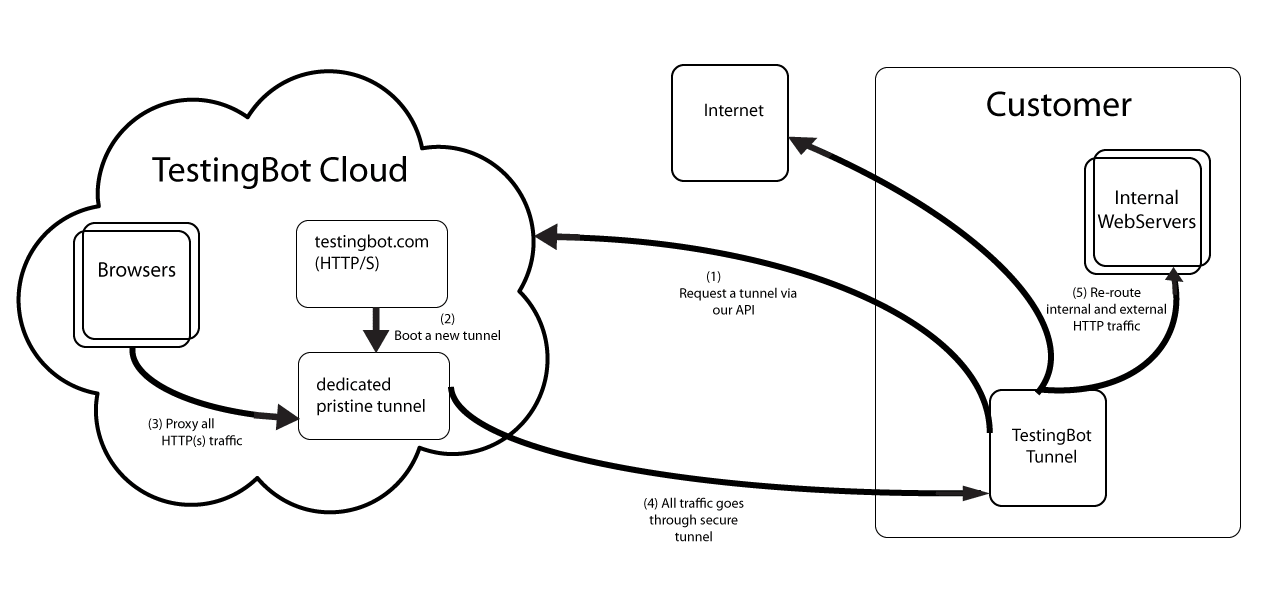
A Java application that proxies HTTP, HTTPS and WebSocket traffic between your network and the TestingBot browser and device grid.
When the tunnel is running, every request your test makes to localhost:4445/wd/hub is forwarded over an SSH-encrypted channel to a dedicated VM in the TestingBot cloud. That VM then routes browser traffic back through the tunnel to your local server, so the cloud browser can reach pages on your laptop, your CI runner or your private staging environment without any firewall or IP-whitelisting changes.
- Encryption
- SSH
- Protocols
- HTTP/1, /2, /3, WS, SSE
- Outbound ports
- 443 + 22
- Architecture
- Java
Quickstart
Most teams have the tunnel running in under 5 minutes. The steps below assume Java 11+ is already installed. For Docker, Maven and the NodeJS launcher, see the installation guide.
One file, no daemon, no service to install. The JAR is the canonical distribution and runs everywhere Java 11+ runs.
curl -O https://testingbot.com/downloads/testingbot-tunnel.zip
unzip testingbot-tunnel.zipWait for the message You may start your tests. The tunnel provisions a dedicated VM in the TestingBot cloud and opens an SSH-encrypted channel.
java -jar testingbot-tunnel.jar TESTINGBOT_KEY TESTINGBOT_SECRETThat is the only change required. All Selenium, Appium, Playwright and Cypress capabilities work the same.
- https://hub.testingbot.com/wd/hub
+ http://localhost:4445/wd/hub
Need more detail? Read the extended quickstart guide with language-specific examples.
Key features
Static caching and compression keep round-trip latency low. See monitoring.
SSH-encrypted channel, dedicated ephemeral VM, automatic teardown. Security model.
HTTP/1, /2, /3, WebSockets and SSE. Built for parallel workloads. Troubleshoot.
Single JAR or Docker image. Ready in under a minute. Installation.
Documentation
Eleven focused guides covering everything from your first test to production monitoring.
System requirements
- Java11+ (17 LTS recommended)
- RAM4 GB minimum
- CPU2 cores
- OSWindows / macOS / Linux / BSD
The tunnel needs outbound port 443 (HTTPS) and 22 (SSH) to *.testingbot.com. No inbound ports required.
For heavy parallel testing, scale CPU and RAM with concurrent sessions, or run multiple tunnels.
Graceful shutdown
Stop the tunnel cleanly so the cloud can deregister your VM and free your tunnel slot.
Ctrl+C
~/.testingbot-tunnel.pidkill -SIGUSR1 <pid>Tunnel clients
Launch and stop the tunnel programmatically from your test runner or CI pipeline.
Two official launchers handle the tunnel lifecycle so you do not have to manage the JAR yourself:
- NodeJS: testingbot-tunnel-launcher — start and stop the tunnel from any npm-based test runner.
- GitHub Actions: testingbot-tunnel-action — drop-in workflow step that boots the tunnel before your tests and tears it down after. See the GitHub Actions guide.
The tunnel also ships as a Docker image and as a Maven dependency. See the installation guide for all options.