GitHub PR Status Checks
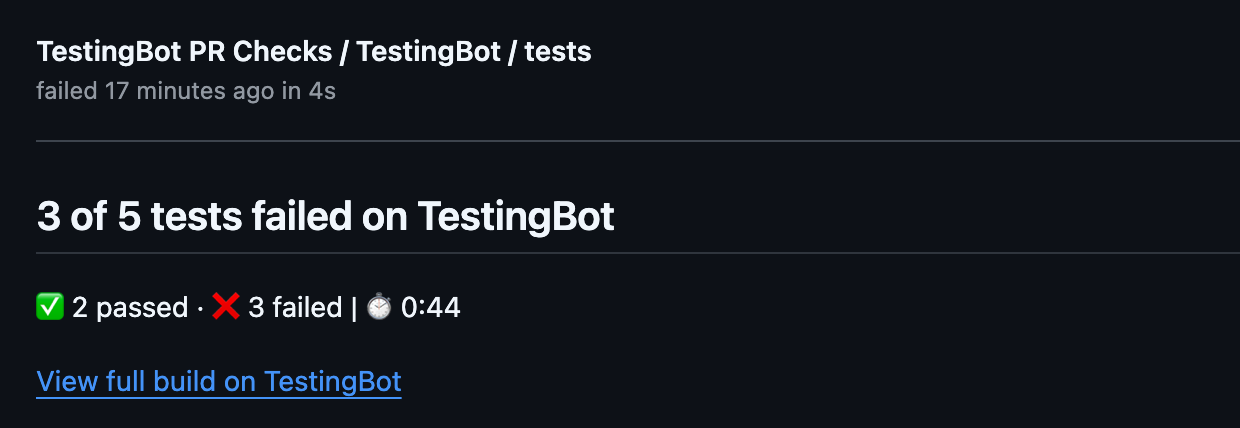
The TestingBot GitHub App posts a single TestingBot / tests status check on
each pull request. The check shows a browser and device result matrix with a deep link to every failing
session's video and logs, a short AI summary of why the failing tests failed, and it can be made a
required status check so a pull request cannot be merged while your TestingBot
tests are failing.
This works alongside the TestingBot GitHub Action (or any CI that runs your TestingBot tests): you group a run's sessions under one build, then register that build against the pull request so its result becomes the check. Maestro runs need no registration step at all: the TestingBot CLI and the Maestro GitHub Action pass the commit along, and the check follows automatically.
Install the GitHub App
- In the members area, open Integrations and choose GitHub PR Checks.
- Click Install the TestingBot GitHub App. You will be redirected to GitHub.
- Pick the account or organization and the repositories to enable, then install. You are redirected back and the integration shows as Connected.
You can change the repository selection or uninstall the app from your GitHub settings at any time. Only account owners and admins can connect or disconnect the integration.
Register the build from your workflow
Give every session in a run the same build capability (the example workflow uses
TB_BUILD), then add two steps around your test job. The first registers the build
against the pull request's head commit and posts an in-progress check; the second marks the build finished so the
check resolves to pass or fail. Pass github.event.pull_request.head.sha as the commit
(not github.sha, which is the merge commit) so the check lands on the commit GitHub
evaluates for merging.
jobs:
  test:
    runs-on: ubuntu-latest
    env:
      TB_KEY: ${{ secrets.TESTINGBOT_KEY }}
      TB_SECRET: ${{ secrets.TESTINGBOT_SECRET }}
      TB_BUILD: github-${{ github.run_id }}-${{ github.run_attempt }}
    steps:
      - uses: actions/checkout@v4

      - name: Start TestingBot PR check
        if: github.event_name == 'pull_request'
        run: |
          curl -sf -u "$TB_KEY:$TB_SECRET" \
            -X POST "https://api.testingbot.com/v1/builds/$TB_BUILD/ci" \
            -d "repo=${{ github.repository }}" \
            -d "commit_sha=${{ github.event.pull_request.head.sha }}" \
            -d "pull_request_number=${{ github.event.pull_request.number }}"

      - name: Run your TestingBot tests
        run: |
          # your existing test command, using build: $TB_BUILD in the capabilities

      - name: Resolve TestingBot PR check
        if: ${{ always() && github.event_name == 'pull_request' }}
        run: |
          curl -sf -u "$TB_KEY:$TB_SECRET" \
            -X PUT "https://api.testingbot.com/v1/builds/$TB_BUILD/ci"
The check appears as in-progress the moment you register the build, then resolves once you signal completion. If the workflow stops before the resolve step runs, TestingBot finalizes the check automatically after a short grace period, so a pull request is never left waiting on a check that will never arrive.
For pull_request runs, always pass
github.event.pull_request.head.sha. Passing
github.sha posts the check to the merge commit, which is not part of the pull
request, so the check appears to be missing and the PR cannot be merged.
Maestro runs
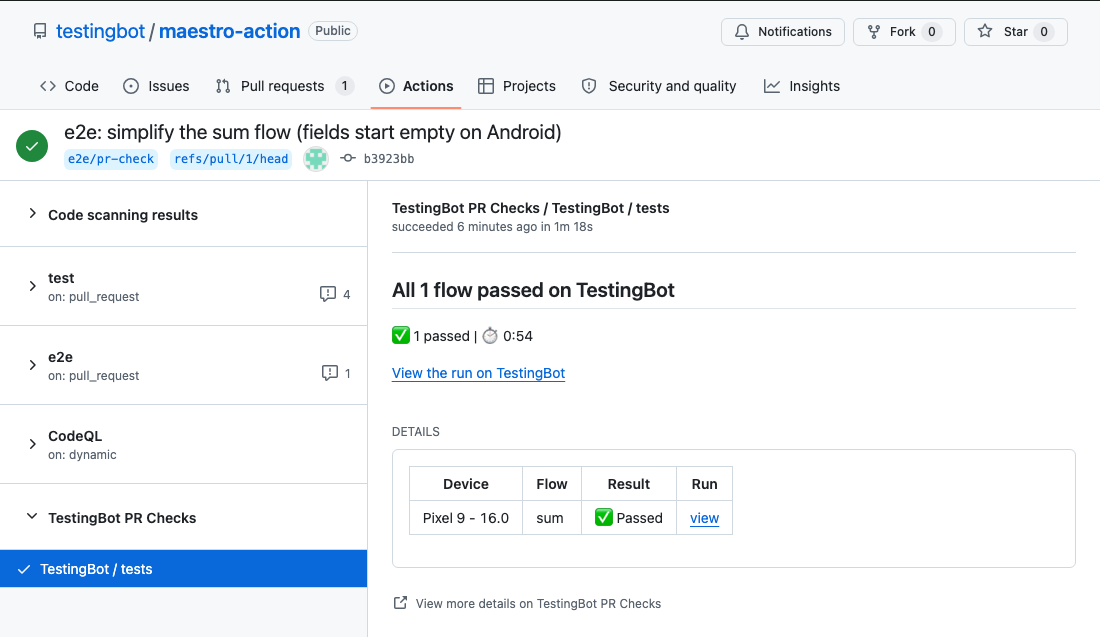
Maestro runs started with the TestingBot CLI or the Maestro GitHub Action get the same TestingBot / tests check without the register and resolve steps above: the run carries the repository and head commit itself, and TestingBot finalizes the check once every flow on every device has finished. The check lists each flow per device and the sticky comment carries the same table. Setup, the merge-gate rules and troubleshooting are on GitHub PR Checks for Maestro.
Require tests to pass before merging
To block a pull request from merging until your TestingBot tests pass, make the check mandatory with branch protection rules:
- In your GitHub repository, go to Settings → Branches (or Rules → Rulesets).
- Add a rule for your default branch (for example
main). - Enable Require status checks to pass before merging.
- Search for and select
TestingBot / testsas a required check.
Once enabled, the Merge button stays disabled until the TestingBot build passes on the pull request's latest commit.
How the pass/fail result is decided
The check reflects the aggregate result of every session in the build:
- Passing when every test in the build passed.
- Failing when any test failed.
- Failing when the build is incomplete or reported no definitive result. This is deliberate: a stuck or undetermined build blocks the merge instead of silently allowing it, because GitHub treats a neutral check as passing.
In other words, the check is green only when the build is genuinely green. A workflow that dies before signalling completion is finalized as failing by the grace-period watchdog rather than left pending forever.
Pull request comment and AI summary
Alongside the check, TestingBot maintains a single, self-updating comment on the pull request with the full browser and device result matrix. Failing environments are listed first, each with a deep link to that session's video, logs and step timeline. Pushing new commits updates the same comment rather than adding new ones.
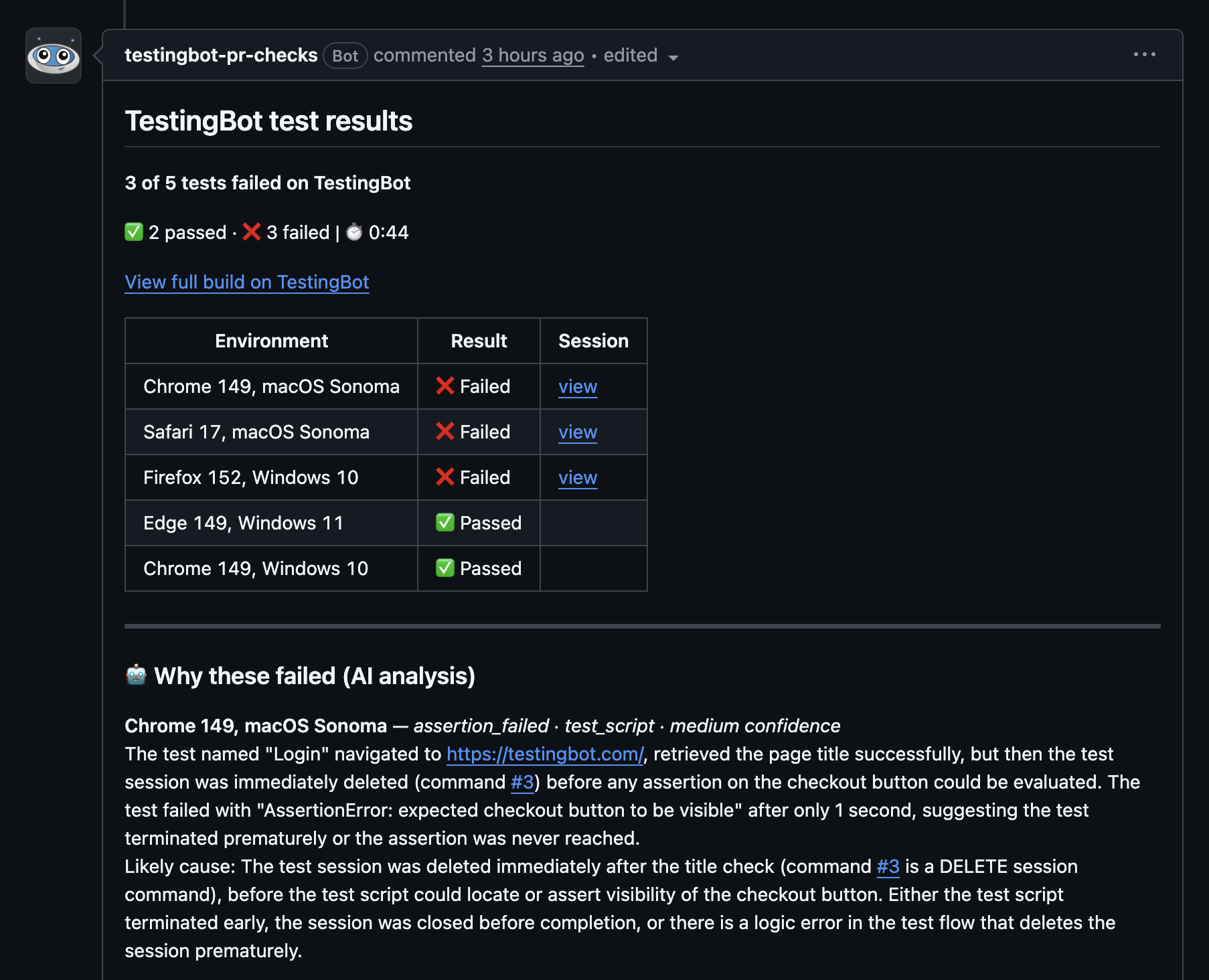
When tests fail, TestingBot adds a short "Why these failed" section that uses AI to explain the most likely cause of the top failing tests, right in the check and the comment, so you can triage without leaving the pull request. The check also carries a Re-run analysis button to re-evaluate the current build result on demand.
Troubleshooting
-
The check does not appear on the pull request. Make sure you passed the pull request's head
SHA (
github.event.pull_request.head.sha), not the merge commit, and that the app is installed on the repository. - The check is not selectable as a required check. GitHub only lists a check as a required-check option after it has run at least once on the protected branch within the last 7 days. Open one pull request so the check runs, then add it to your branch protection rule.
-
The check is stuck as in-progress. Confirm your workflow calls the
PUTstep when the run finishes. If the workflow was cancelled, the watchdog finalizes the check as failing after a short grace period. - Nothing posts at all. Verify the integration shows as Connected under GitHub PR Checks and that the repository owner matches the account the app was installed on.
-
A Maestro run shows no check. The CLI logs
GitHub check registeredwhen the link was made. Without that line, check that--repo-owner,--repo-nameand a full 40-character--commit-shawere passed (the Maestro GitHub Action does this for you) and that the app is installed for the repository owner.
