A day of runs
The day page answers the question you ask after a red night in CI: what changed today? It compares one day with the day before, shows the day hour by hour, lists every test that failed and every test that was fixed, and every run of the day.
Open it by clicking a day in the Runs per day chart on the Test Analytics dashboard.
The buttons in the top right, labelled with the dates either side (for example ‹ Oct 13 and Oct 15 ›), go to the day before and the day after, so you can walk through a week day by day.
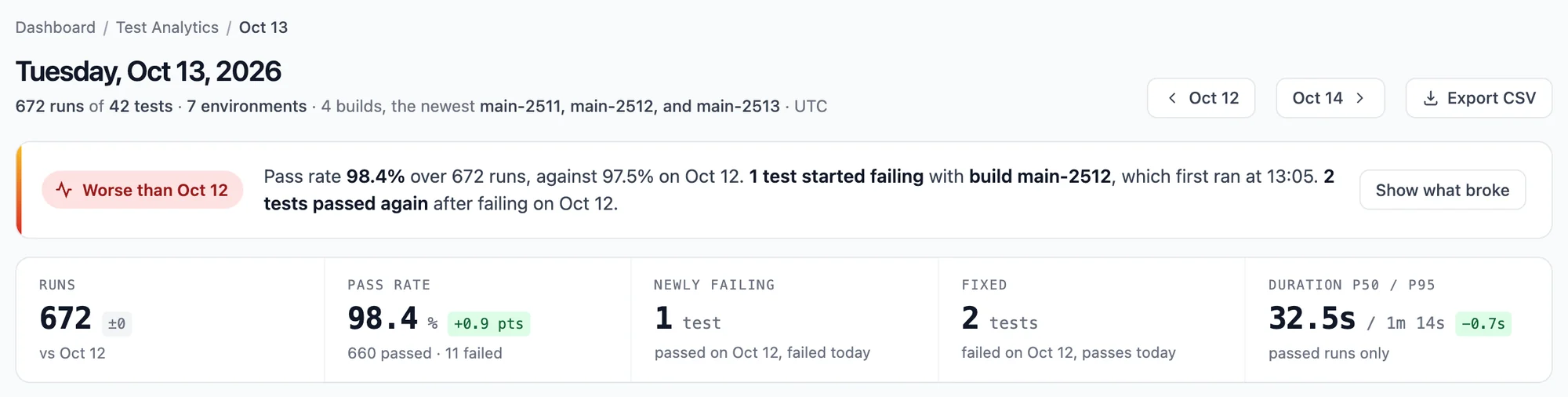
The title is the date, for example Tuesday, Oct 14, 2026, and the line below it sums the day up: its runs, tests and environments, and the builds that ran.
Days are UTC days, from 00:00 to 24:00 UTC.
Against the day before
The first card compares the day with the day before, with a label on the left:
| Label | When |
|---|---|
| Worse than <day before> | The pass rate fell by 2 points or more, or a test started failing. |
| Better than <day before> | The pass rate rose by 2 points or more, and no test started failing. |
| Like <day before> | Neither. |
| No runs | No automated run finished that day. |
When tests started failing, the sentence names the build in which they first failed, so you know which change to look at. Show what broke jumps to the What broke list.
A whole day is compared with the whole day before, also while today is still going: early in the day, today has fewer runs than yesterday.
The numbers
| Number | What it is |
|---|---|
| Runs | Finished runs that day, with the change against the day before. |
| Pass rate | Passed out of passed and failed runs, with the change in points, and how many passed and failed. |
| Newly failing | Tests that failed today and passed the day before (at least one pass and no failure the day before). |
| Fixed | Tests that failed the day before and passed every run today. |
| Duration p50 / p95 | The median and 95th percentile duration of the day's passed runs, with the change of the median in seconds. |
The day, hour by hour
A timeline of the day from 00:00 to 24:00 UTC with a row per environment and a mark per run, placed at the time the run started:
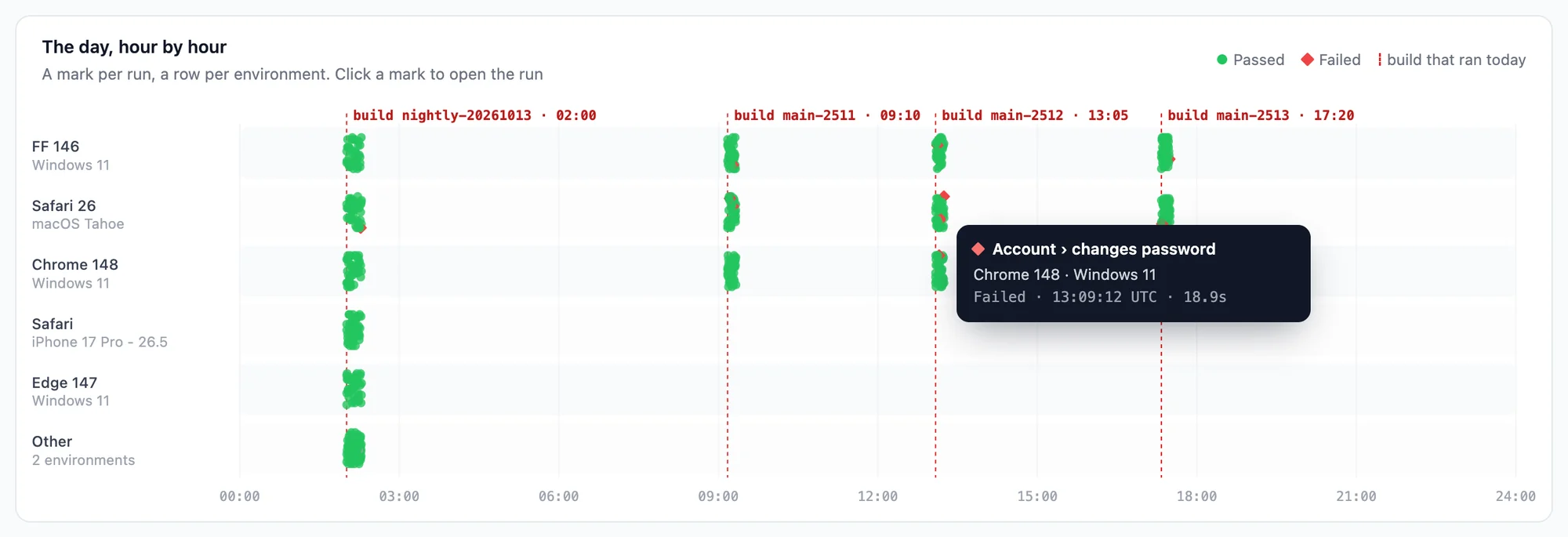
- Green dot: the run passed.
- Red diamond: the run failed.
- Grey dot: the run has no result.
- Dashed red line: the moment a build first ran that day. The 5 newest builds are named at the top, with their start time.
The 5 environments with the most runs get a row each; the others share an Other row. This makes patterns easy to spot: failures that start right after a build line point at that build, and failures that fill one row point at one browser or device.
Hover over a mark to see the test, its environment, the time it started, its duration and its build, and for a failed run where it failed. Click a mark to open the run in the test panel next to the page, with its video, steps and logs.
On a busy day the chart draws the newest 2,000 runs and says so above the chart: The newest 2,000 of 5,312 runs. All runs are still in the numbers and in the Runs list.
What broke
Every test that failed that day. Tests that started failing come first (they passed the day before), then the others, most failures first. A day has too few runs per test to call a test flaky, so this list shows every failure rather than only failing and flaky tests.
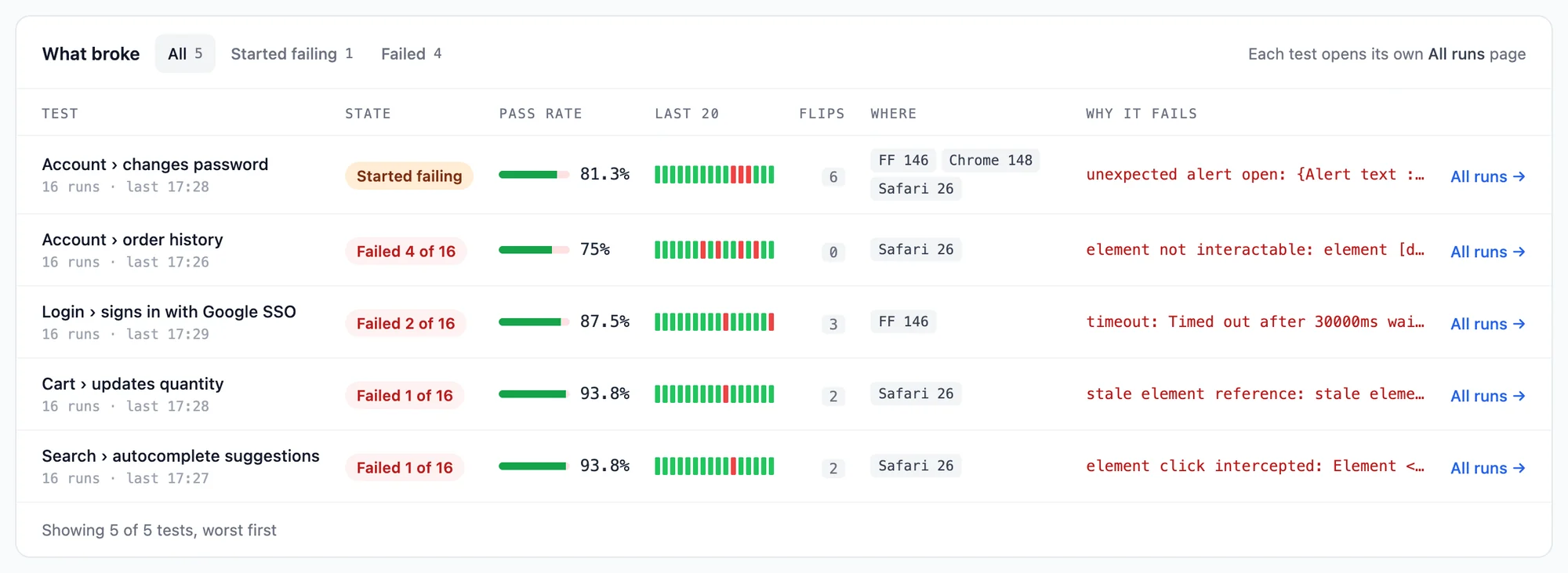
The table has the same columns as Needs attention on the dashboard: the test, its state, pass rate, last 20 runs, flips, where it fails and why it fails. The state is either Started failing or Failed 3 of 8: how many of its runs that day failed. The Started failing and Failed tabs narrow the list. The first 6 tests show; Show all lists the rest.
What broke lists up to 200 tests, those with the most failures. On a day with more failed tests it says so; the Failed tab of Runs still has every failed run.
Compared per environment
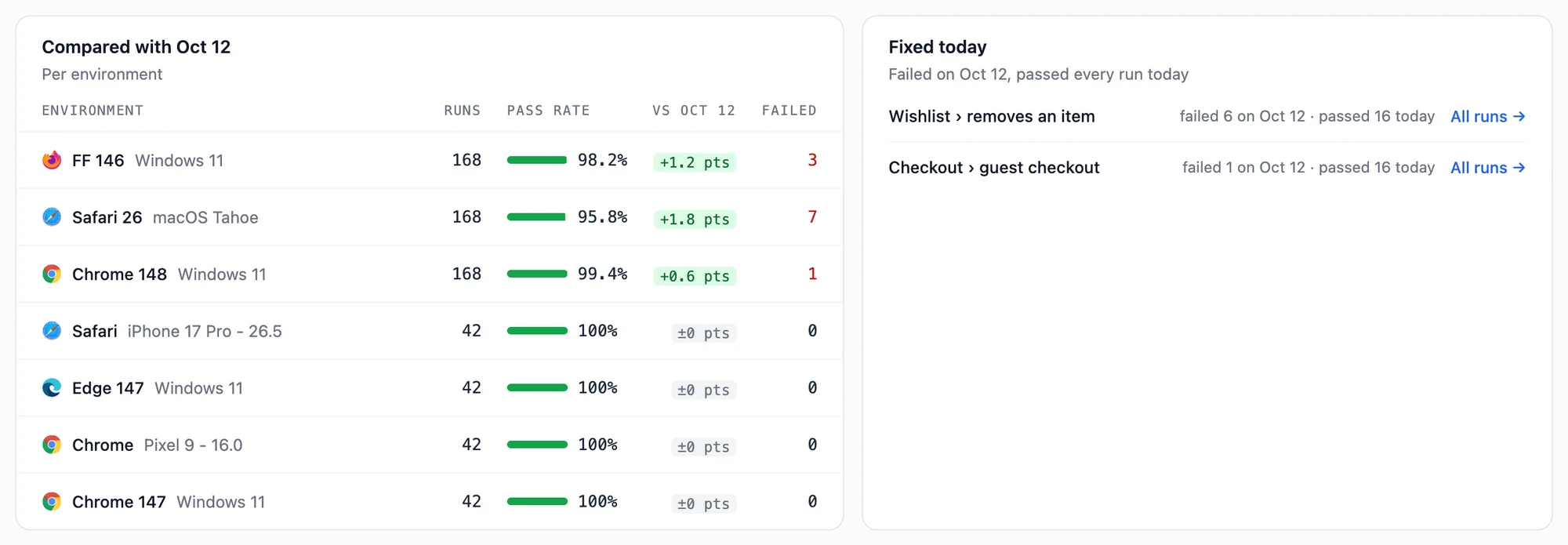
The Compared with <day before> table has a row per environment, most runs first: its runs, pass rate, the change of its pass rate against the day before, and its failed runs. A red change shows which browser or device got worse. The first 8 environments show; Show all lists the rest.
Fixed today
Tests that failed the day before and passed every run today, most runs first, for example failed 4 on Oct 13 · passed 6 today. All runs → opens the test's All runs page, to confirm the fix holds.
Runs
Every run of the day, newest first, with its start time, test name, result, environment, build, duration and, for a failed run, the step it failed at.
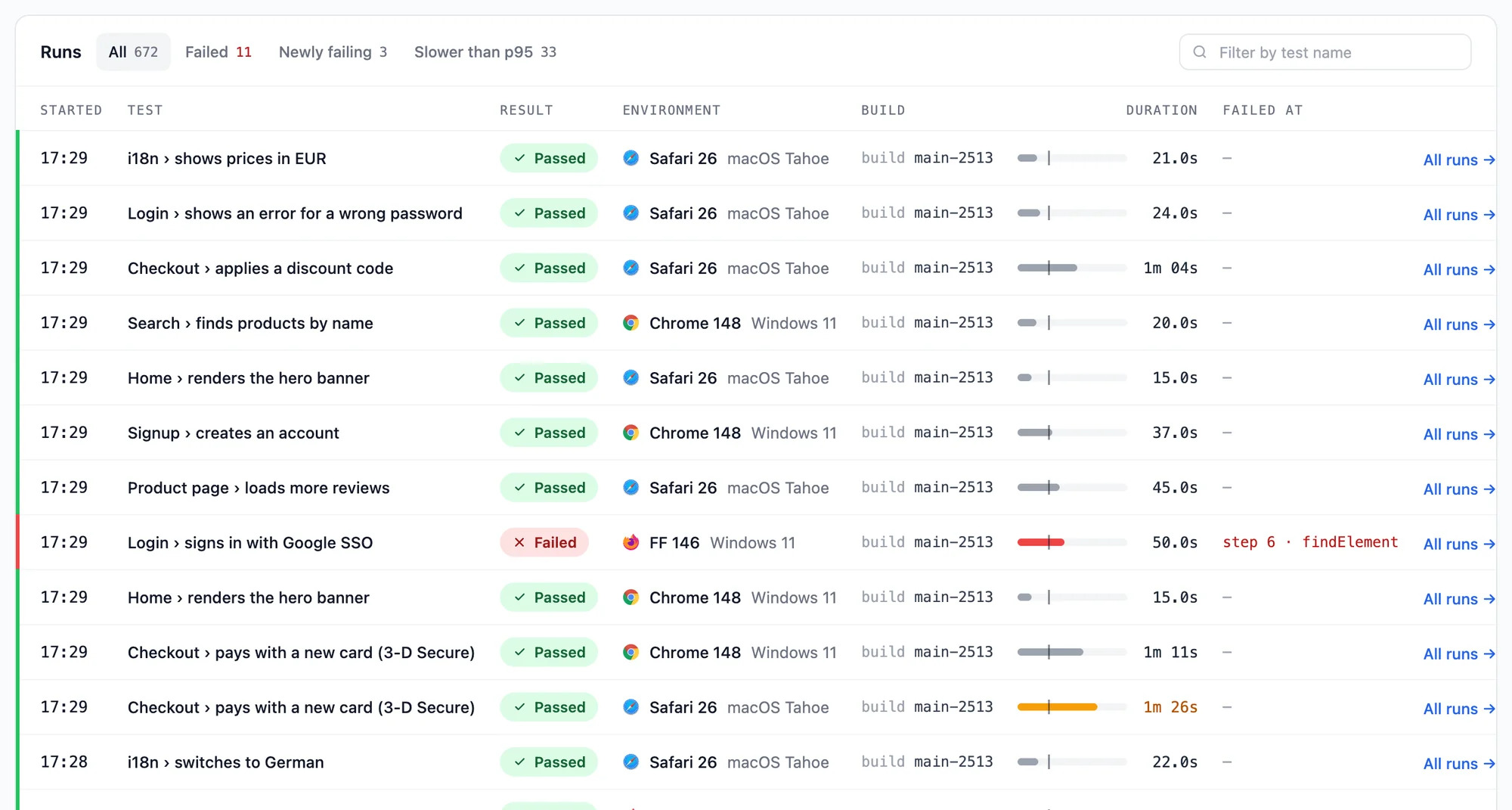
| Tab | Lists |
|---|---|
| All | Every run of the day. |
| Failed | The failed runs. |
| Newly failing | The failed runs of tests that passed the day before. |
| Slower than p95 | Passed runs that took longer than the day's p95 duration. |
Each tab shows how many runs it has. Filter by test name narrows the list to tests whose name contains what you type. The first 25 runs show; Load 25 more adds the next ones. Runs that finish while you read the page do not shift the list.
Click a run to open it in the test panel next to the list, or All runs to open that test's All runs page.
A day page whose URL carries Test Analytics filters (an environment, build, tag or team member) says Filtered as on Test Analytics under the title. Show every run removes the filters.
CSV export
Export CSV downloads every run matching the day's Test Analytics filters, newest first, regardless of the open Runs tab or test-name search, as test-runs-<date>.csv. It has a row per run:
| Column | Contains |
|---|---|
started_at |
When the run started, in UTC (ISO 8601) |
test |
The test name |
result |
passed, failed or unknown
|
browser |
The browser name and version |
os |
The operating system or device |
build |
The build name, if any |
duration_seconds |
From start to finish, in seconds |
session_id |
The session id, as used by the REST API |
url |
The link to the run in the member dashboard |
