Maestro on GitHub Actions
The TestingBot Maestro GitHub Action runs your Maestro flows on TestingBot real devices, emulators and simulators from a workflow. It wraps the TestingBot CLI, fills in branch, commit, repository and pull request from the workflow context, writes a results table to the job summary and exposes every result as an output. Store your credentials in Settings → Secrets and variables → Actions as repository secrets.
Workflow
name: Maestro Tests

on:
  push:
    branches: [main]
  pull_request:
    branches: [main]

jobs:
  maestro-tests:
    runs-on: ubuntu-latest
    steps:
      - uses: actions/checkout@v4

      - name: Build Android App
        run: ./gradlew assembleDebug

      - name: Run Maestro Tests on TestingBot
        id: maestro
        uses: testingbot/maestro-action@v1
        with:
          api-key: ${{ secrets.TB_KEY }}
          api-secret: ${{ secrets.TB_SECRET }}
          app-file: app/build/outputs/apk/debug/app-debug.apk
          workspace: .maestro
          device: Pixel 9
          device-version: '14'
          report: junit
          download-artifacts: failed

      - name: Upload Test Results
        uses: actions/upload-artifact@v4
        if: always()
        with:
          name: maestro-results
          path: |
            testingbot-reports
            testingbot-artifacts
The action fails the step with exit code 2 when a flow fails and 1 on CLI or infrastructure errors. Its outputs let later steps react to the result:
| Output | Description |
|---|---|
app-id |
Project ID; pass it as app-binary-id in later jobs to skip the upload |
console-url |
Link to the results in the TestingBot dashboard |
outcome |
passed, failed, started (async), dry-run or error
|
flow-results |
JSON array of per-flow results with name, status, device, duration and errors |
results-file |
Path to the full JSON document written by the CLI |
Every CLI feature is available as an input: device-matrix, real-device, include-tags, exclude-flows, env, retry, shard-split, async and more. The inputs mirror the Maestro Cloud action, so migrating is usually a one-line change; see the action README for the full list.
Prefer the CLI directly? The same run without the action:
      - uses: actions/setup-node@v4
        with:
          node-version: '22'
      - name: Run Maestro Tests
        run: |
          npx --yes @testingbot/cli@latest maestro \
            app/build/outputs/apk/debug/app-debug.apk ./maestro-flows \
            --device "Pixel 9" --deviceVersion "14" \
            --report junit --report-output-dir ./test-results \
            --commit-sha ${{ github.event.pull_request.head.sha || github.sha }} \
            --branch ${{ github.head_ref || github.ref_name }} \
            --pull-request-id ${{ github.event.pull_request.number }} \
            --repo-owner ${{ github.repository_owner }} \
            --repo-name ${{ github.event.repository.name }}
        env:
          TB_KEY: ${{ secrets.TB_KEY }}
          TB_SECRET: ${{ secrets.TB_SECRET }}
Add TB_KEY and TB_SECRET as repository secrets in your GitHub repository settings. Never commit credentials to your repository.
Triggers and pull requests from forks
Run on pushes to your default branch and on pull requests. For pull_request events the action uses the pull request's head commit, which is what branch protection evaluates. Pull requests from forks cannot read repository secrets under pull_request; if you need them, use pull_request_target and check out the PR head explicitly so the tests run against the proposed code rather than the base branch:
on:
  push:
    branches: [main]
  pull_request_target:
    branches: [main]

jobs:
  maestro:
    runs-on: ubuntu-latest
    steps:
      - uses: actions/checkout@v4
        with:
          ref: ${{ github.event.pull_request.head.sha }}
A Linux runner is enough for iOS too: the tests run on TestingBot's simulators and devices, not on the runner, so no macOS minutes are needed unless you build the app in the same job.
Android, iOS and Expo apps
| Platform | app-file |
|---|---|
| Android | An .apk, for example app/build/outputs/apk/debug/app-debug.apk. Emulators by default; add real-device: true for a physical device. |
| iOS simulator | A simulator .app bundle or a .zip of it (xcodebuild -sdk iphonesimulator). |
| iOS real device | An .ipa. Real devices are selected automatically for .ipa files. |
| Expo / EAS | Download the build in a previous step and pass its path, or pass the eas build URL with extra-args: --app-url <url>. For EAS Workflows use the EAS integration. |
Inputs
| Input | Description |
|---|---|
api-key, api-secret
|
TestingBot credentials. Required. |
app-file |
App under test (.apk, .ipa, .app, .zip, .tar.gz). Either this or app-binary-id. |
app-binary-id |
Project ID of an app uploaded earlier (the app-id output); skips the upload. |
workspace |
Flows directory, file or glob; several entries one per line. Default .maestro. |
name |
Run name in the dashboard. Defaults to the PR title, then the commit message. |
async |
Submit and return immediately; the step never fails on results. |
timeout |
Minutes to wait for results before cancelling and failing. Default 60. |
env |
Flow environment variables, one KEY=VALUE per line. |
include-tags, exclude-tags, exclude-flows
|
Flow selection, comma-separated. |
device, device-version, platform, real-device
|
Single device selection. Platform is detected from the app when omitted. |
device-matrix |
Run every flow on each listed device, <device>[:<version>][:real], one per line. Not with device. |
device-locale, timezone, orientation, google-play
|
Device settings. |
retry, shard-split, maestro-version
|
Retries (0-2), parallel shards per device, Maestro version. |
report, report-output-dir
|
junit, html, html-detailed or allure, saved to testingbot-reports by default. |
download-artifacts, artifacts-output-dir
|
all or failed: logs, screenshots and video as a zip. |
other-app, metadata, groups, throttle-network, geo-country-code, tunnel, tunnel-identifier
|
Companion apps, free-form metadata, dashboard groups, network profile, IP geolocation and the TestingBot Tunnel. |
check-name |
Names the pull request check TestingBot / <name>, for one check per job on the same commit (iOS, Android). Keep it stable per job. |
cli-version, dry-run, extra-args
|
Pin the CLI version, validate without running, or append raw CLI arguments. |
The action README lists every input with its default.
Outputs
Give the step an id and read its outputs in later steps or jobs:
| Output | Description |
|---|---|
app-id |
TestingBot project ID. Pass it as app-binary-id to skip the upload in a later job. |
console-url |
Link to the results in the TestingBot dashboard. |
outcome |
passed, failed, started (async), dry-run or error. |
flow-results |
JSON array with one entry per flow attempt: name, status, passed, attempt, latest, device, durationSeconds, errors, url. |
results-file |
Path to the full JSON document the CLI wrote. |
Post the result to Slack
- id: maestro
  uses: testingbot/maestro-action@v1
  with:
    api-key: ${{ secrets.TB_KEY }}
    api-secret: ${{ secrets.TB_SECRET }}
    app-file: app.apk

- uses: slackapi/slack-github-action@v2
  if: always()
  with:
    method: chat.postMessage
    token: ${{ secrets.SLACK_BOT_TOKEN }}
    payload: |
      channel: "C0123456789"
      text: "Maestro on TestingBot: ${{ steps.maestro.outputs.outcome }} — ${{ steps.maestro.outputs.console-url }}"
Keep the results as a workflow artifact
- uses: actions/upload-artifact@v4
  if: always()
  with:
    name: maestro-results
    path: |
      ${{ steps.maestro.outputs.results-file }}
      testingbot-reports
      testingbot-artifacts
The job summary always gets a results table with a link per flow, so most runs need no extra reporting step.
Examples
Upload once, run two suites on different devices
- id: smoke
  uses: testingbot/maestro-action@v1
  with:
    api-key: ${{ secrets.TB_KEY }}
    api-secret: ${{ secrets.TB_SECRET }}
    app-file: app.apk
    workspace: .maestro/smoke
    device: Pixel 9

- uses: testingbot/maestro-action@v1
  with:
    api-key: ${{ secrets.TB_KEY }}
    api-secret: ${{ secrets.TB_SECRET }}
    app-binary-id: ${{ steps.smoke.outputs.app-id }}
    workspace: .maestro/regression
    device-matrix: |
      Pixel 9:14
      Samsung Galaxy S24:14:real
Pass secrets to your flows
- uses: testingbot/maestro-action@v1
  with:
    api-key: ${{ secrets.TB_KEY }}
    api-secret: ${{ secrets.TB_SECRET }}
    app-file: app.apk
    env: |
      USERNAME=${{ secrets.TEST_USERNAME }}
      PASSWORD=${{ secrets.TEST_PASSWORD }}
    include-tags: smoke,critical
    exclude-tags: wip
Flows read them as ${USERNAME}. GitHub masks secret values in the logs; the action never prints the env values itself.
Fire and forget on pull requests
- uses: testingbot/maestro-action@v1
  with:
    api-key: ${{ secrets.TB_KEY }}
    api-secret: ${{ secrets.TB_SECRET }}
    app-file: app.apk
    async: true
The step returns within seconds and the runner is free while the flows execute on TestingBot. Check on the run later with testingbot status --id <app-id> --wait or in the dashboard. With the TestingBot GitHub App installed the pull request still gets its status check when the run finishes, so merges can be gated without holding a runner.
Pull request status checks
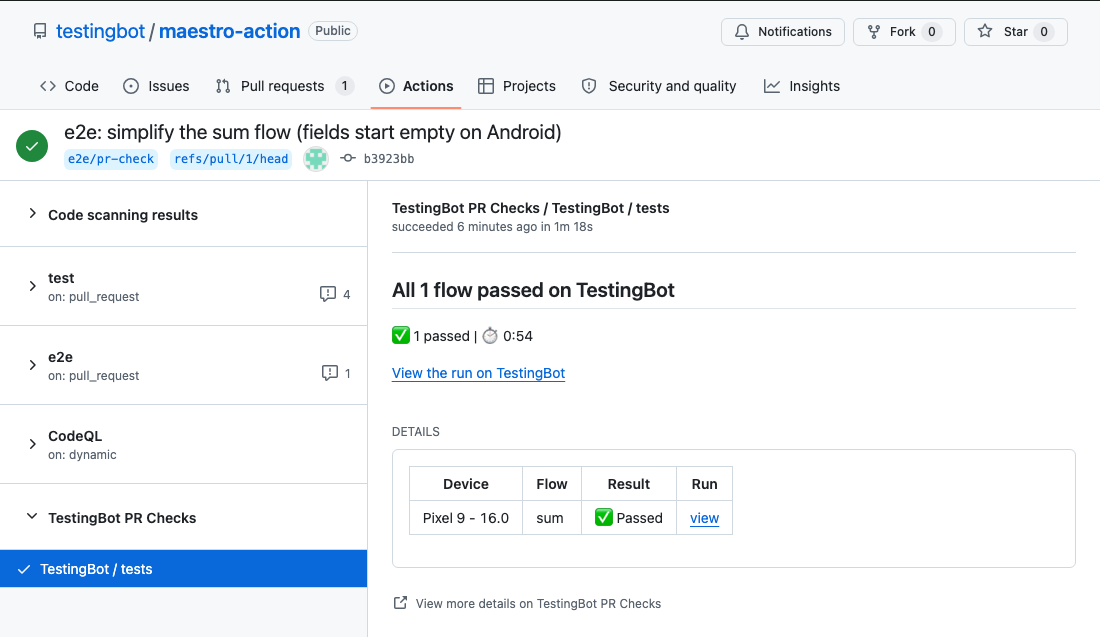
The action passes the repository and the pull request's head commit along, so with the TestingBot GitHub App installed a TestingBot / tests check appears on the pull request, listing each flow on each device, and can be made a required check. Running iOS and Android as separate jobs? Set check-name on each so they post TestingBot / iOS and TestingBot / Android.
Migrating from the Maestro Cloud action
Swap the action and the credentials; the other inputs keep their names. There is no project-id.
- uses: testingbot/maestro-action@v1
  with:
    api-key: ${{ secrets.TB_KEY }}
    api-secret: ${{ secrets.TB_SECRET }}
    app-file: app.zip
    workspace: .maestro
    include-tags: smoke
Outputs map as MAESTRO_CLOUD_CONSOLE_URL → console-url, MAESTRO_CLOUD_APP_BINARY_ID → app-id, MAESTRO_CLOUD_UPLOAD_STATUS → outcome and MAESTRO_CLOUD_FLOW_RESULTS → flow-results. The full flag mapping is on the migration page.
Frequently asked questions
How do I run Maestro tests on TestingBot from GitHub Actions?
Add the testingbot/maestro-action@v1 step with your API key and secret as repository secrets, the app file and the flows directory. The action uploads the app and flows, runs them on TestingBot and fails the step when a flow fails. See the workflow example.
Can the action reuse an app uploaded in an earlier step?
Yes. Every run exposes an app-id output; pass it as app-binary-id in a later step or job to skip the upload. See the examples.
Does the action post a status check on the pull request?
Yes, when the TestingBot GitHub App is installed for the repository. The action passes the head commit and repository along and the check appears automatically. See GitHub PR Checks for Maestro.
Which exit codes does the action step return?
The same as the CLI: 2 when one or more flows failed, 1 on a CLI or infrastructure error, 0 otherwise, including async and dry-run.
Do I need a macOS runner for iOS?
No. The flows run on TestingBot's simulators and real devices, so ubuntu-latest is enough for both platforms. Use a macOS runner only if you build the iOS app in the same job.
How do I run tests on pull requests from forks?
Forked pull requests cannot read repository secrets under pull_request. Use pull_request_target and check out github.event.pull_request.head.sha explicitly. See triggers.
Is it a drop-in replacement for the Maestro Cloud action?
Mostly. Swap the uses line and the credentials; app-file, workspace, env, tags, async and the other inputs keep their names. See migrating.
