GitHub PR Checks for Maestro
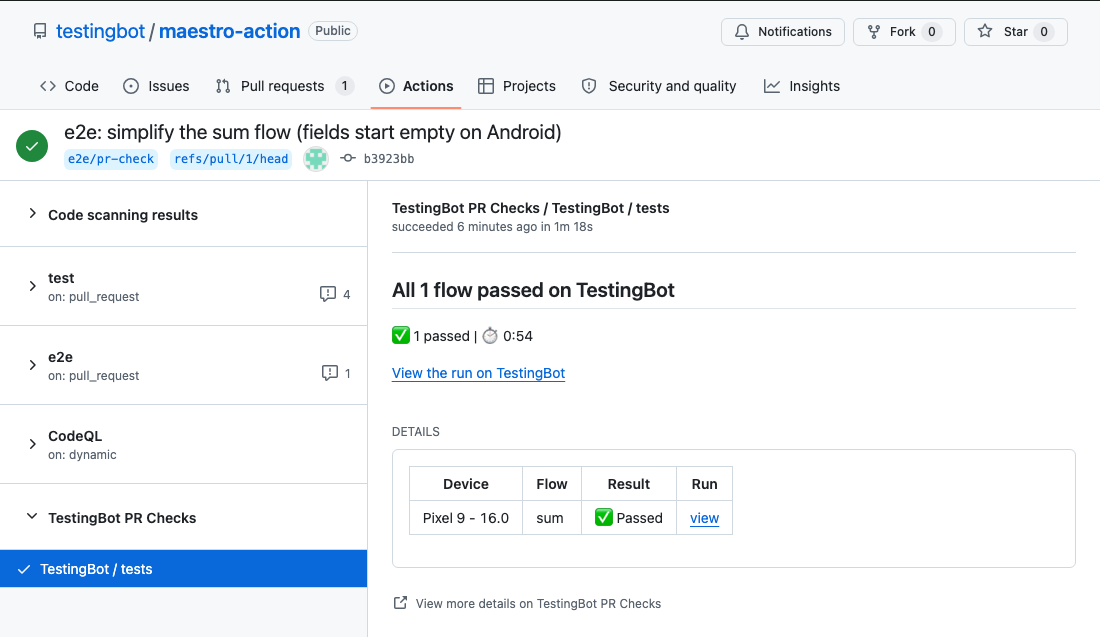
With the TestingBot GitHub App installed, every Maestro run started from a pull request posts a native TestingBot / tests status check on it: each flow on each device, failures first, with a link to the run in the TestingBot dashboard. Make it a required check and a pull request cannot be merged while a Maestro flow is failing. There is nothing to register or resolve from your workflow; the Maestro GitHub Action and the TestingBot CLI pass the commit along and TestingBot finalizes the check when every flow has finished.
Install the GitHub App
- In the members area, open Integrations and choose GitHub PR Checks.
- Click Install the TestingBot GitHub App. You are redirected to GitHub.
- Pick the account or organization and the repositories to enable, then install. You are redirected back and the integration shows as Connected.
Install through TestingBot rather than from GitHub's app settings, so the installation is linked to your TestingBot account. Only account owners and admins can connect or disconnect the integration. Sub-accounts of a team share the owner's installation: a run started with a sub-account's API key posts checks as long as the app is installed under the team owner.
Repositories and disconnecting
Checks appear only on repositories the app can reach. The integration page shows whether the app covers all repositories or a selection, with a link to change the selection on GitHub; changes apply immediately because TestingBot listens to GitHub's installation events. Disconnecting from the integration page stops checks; reconnecting later reuses the existing installation.
Run from a pull request
With the Maestro GitHub Action a single step is enough; it fills in the repository, head commit, branch and pull request from the workflow context:
- uses: testingbot/maestro-action@v1
  with:
    api-key: ${{ secrets.TB_KEY }}
    api-secret: ${{ secrets.TB_SECRET }}
    app-file: app/build/outputs/apk/debug/app-debug.apk
    workspace: .maestro
From any other CI, pass the metadata flags to the CLI. The commit SHA must be the full 40-character head commit of the pull request, not the merge commit:
npx --yes @testingbot/cli@latest maestro app.apk ./flows \
  --repo-owner "$REPO_OWNER" --repo-name "$REPO_NAME" \
  --commit-sha "$HEAD_SHA" --branch "$BRANCH" \
  --pull-request-id "$PR_NUMBER"
Async runs are a good fit: with --async (or async: true on the action) the CI step returns within seconds, the flows run on TestingBot, and the check is finalized when they finish, so merges are gated without holding a runner. The CLI prints GitHub check registered for owner/repo@sha when the link was made. If that line is missing, one of the values was absent, the commit SHA was not the full head SHA, or the app is not installed for the repository owner. In EAS Workflows the eas-workflow wrapper sets the same flags from TB_GH_* variables.
Pull request comment
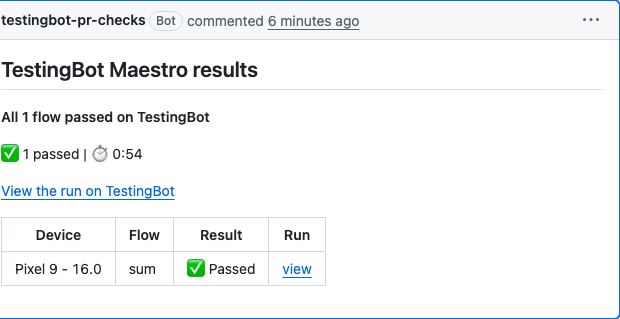
Alongside the check, TestingBot maintains one self-updating comment on the pull request with the same device, flow and result table. Pushing new commits updates the comment rather than adding new ones.
Require green flows before merging
- In your GitHub repository, go to Settings → Branches (or Rules → Rulesets).
- Add a rule for your default branch and enable Require status checks to pass before merging.
- Select
TestingBot / testsas a required check. GitHub lists it once it has run on the branch at least once in the last 7 days, so open one pull request first.
The check is green only when every run finished and every flow passed. A cancelled run, a failed flow or a run that never completed all conclude as failing, so the merge stays blocked until the tests are genuinely green. Flows that failed and then passed on a --retry count as passed; only the newest attempt per flow is judged, the same rule the dashboard and the CLI exit code use. With --device-matrix every device is a row in the same check.
Several runs on one pull request
Each Maestro run posts one check, named TestingBot / tests by default. When more than one run tests the same commit, an iOS job and an Android job for example, give each a check name so they post separate checks that branch protection can require individually: --check-name iOS on the CLI, check-name: iOS on the action, or TB_CHECK_NAME=iOS with the EAS wrapper. The check is then called TestingBot / iOS and gets its own pull request comment.
jobs:
  ios:
    steps:
      - uses: testingbot/maestro-action@v1
        with:
          app-file: app.zip
          check-name: iOS
  android:
    steps:
      - uses: testingbot/maestro-action@v1
        with:
          app-file: app.apk
          check-name: Android
Keep the name stable per job: GitHub matches required checks by name, so a name derived from the commit or run number would create a new check every time and could never be required. Two runs on the same commit with the same name share one check, and the last to finish decides its result. To cover several devices in one job, prefer --device-matrix; every device becomes a row in the same check.
Troubleshooting
-
No check appears. Look for
GitHub check registeredin the CLI output. Without it, check that the repository owner and name and a full 40-character commit SHA were passed (the Maestro GitHub Action does this for you) and that the app is installed for the repository owner. -
The check is on the wrong commit. For
pull_requestevents passgithub.event.pull_request.head.sha;github.shais the merge commit, which is not part of the pull request. - The check is stuck as in-progress. It finalizes when every run and flow has settled. If a run was cancelled or lost, a watchdog concludes the check as failing after about 50 minutes so the pull request is never left waiting.
- The check is not selectable as a required check. GitHub only offers it after it has run at least once on the protected branch in the last 7 days.
- The run was started with another team's key. The check posts only when the API key belongs to the team that installed the app. Check which key your CI secrets hold.
-
Re-running after a failure. The check carries a Re-run analysis button that re-evaluates the current results. To re-run the flows themselves, use
--retryon the run or re-run the CI job; each new run updates the check.
Browser and Appium builds use the same app with a different registration flow; see GitHub PR Checks.
Frequently asked questions
Do I need to register the build from my workflow?
No. Unlike browser builds, a Maestro run registers itself: when it carries the repository and the pull request head commit, and the app is installed, the check is created when the run starts and finalized when every flow has finished.
When is the check green?
Only when every run finished and every flow passed. Cancelled, failed or incomplete runs conclude as failing so the merge stays blocked. A flow that passed on a retry counts as passed. See the merge gate.
Does it work with --async?
Yes. The check is created when the run starts and finalized by TestingBot when the run completes, whether or not the CLI is still waiting.
Can I use it from CI other than GitHub Actions?
Yes. Pass --repo-owner, --repo-name, the full --commit-sha and optionally --branch and --pull-request-id to the CLI from any CI. See run from a pull request.
Can I have one check per platform on the same pull request?
Yes. Give each run a check name (--check-name iOS, the action's check-name input or TB_CHECK_NAME in EAS) and it posts as TestingBot / iOS with its own comment, so branch protection can require each platform separately. See several runs on one pull request.
Why does my Maestro check not appear?
The CLI prints GitHub check registered when the link was made. Without that line, the metadata was incomplete, the commit SHA was not the full head SHA, or the app is not installed for the repository owner. See troubleshooting.
