Self-Healing Locators
A small change to a page, such as a renamed id or a restructured form, can make a locator in your test stop matching, and the test fails with
no such element although the element is still there.
With self-healing turned on, TestingBot remembers each element your test finds, and when the same locator later finds nothing,
it looks for that element with the other things it knows about it. Your test continues, and the test's steps show what was healed, so you can update the locator.
Self-healing is off unless you turn it on, and it never changes a test that does not ask for it.
Enable self-healing
Add the selfHeal option and give the test a name: what TestingBot learns is kept per test name, so a test without a name is never healed.
const capabilities = {
  browserName: 'chrome',
  browserVersion: 'latest',
  platformName: 'WIN11',
  'tb:options': {
    name: 'Checkout flow',
    selfHeal: true
  }
}
With Selenium 3 (JSON Wire Protocol) capabilities, use "selfHeal": true next to "name".
How it works
-
Each time a
findElementcall succeeds, TestingBot reads a few properties of the element the first time that locator is used in a session: its tag,id,name,data-testid(ordata-test,data-qa,data-cy),aria-labeland a short visible text. -
When a later
findElementwith the same locator, in a session of the same test, fails withno such element, TestingBot tries these alternatives in order:id, test id attribute,name,aria-label, visible text. The element's position on the page is deliberately not used: a position always holds some element, also when yours is gone. -
The first alternative that matches exactly one element on the page is used, and your test receives that element as the answer to its
findElementcall. If none matches exactly one element, your test gets the originalno such elementerror.
What TestingBot learned about a test is kept for 8 days after its first run, and for 30 days after each later run of the same test name. It is kept for up to 200 locators per test name and for the 200 test names your account ran most recently, so use a stable test name: a name that contains a build number or a timestamp is a new test on every run and is never healed. This is kept per TestingBot account, so a test name is never matched against another account's tests.
Checks that an element is absent
Self-healing cannot tell a locator that changed from an element that is meant to be gone. Two rules keep it out of the way of such checks:
- A locator that already found an element earlier in the same session is never healed. It works on this version of your page, so when it finds nothing the element is gone: a spinner that finished, a closed dialog, a wait for an element to disappear.
- While a test polls for an element, for example in an explicit wait, TestingBot does not try to heal on every poll: after a try that found nothing, the next one follows after 1, 2, 4 and then 8 seconds.
For a check that an element which your test has not found before is absent, switch self-healing off around it:
await driver.executeScript('tb:selfHeal=off')
// the error banner must not be there
await assert.rejects(driver.findElement(By.css('.error-banner')), { name: 'NoSuchElementError' })
await driver.executeScript('tb:selfHeal=on')
While it is off, nothing is healed and nothing is learned. The switch only has an effect in a session that was started with selfHeal.
If you are moving tests from another provider, their commands work as well:
browserstack_executor: {"action": "selfHeal", "arguments": {"enabled": false}} and lambda-heal-stop / lambda-heal-start.
In the test results
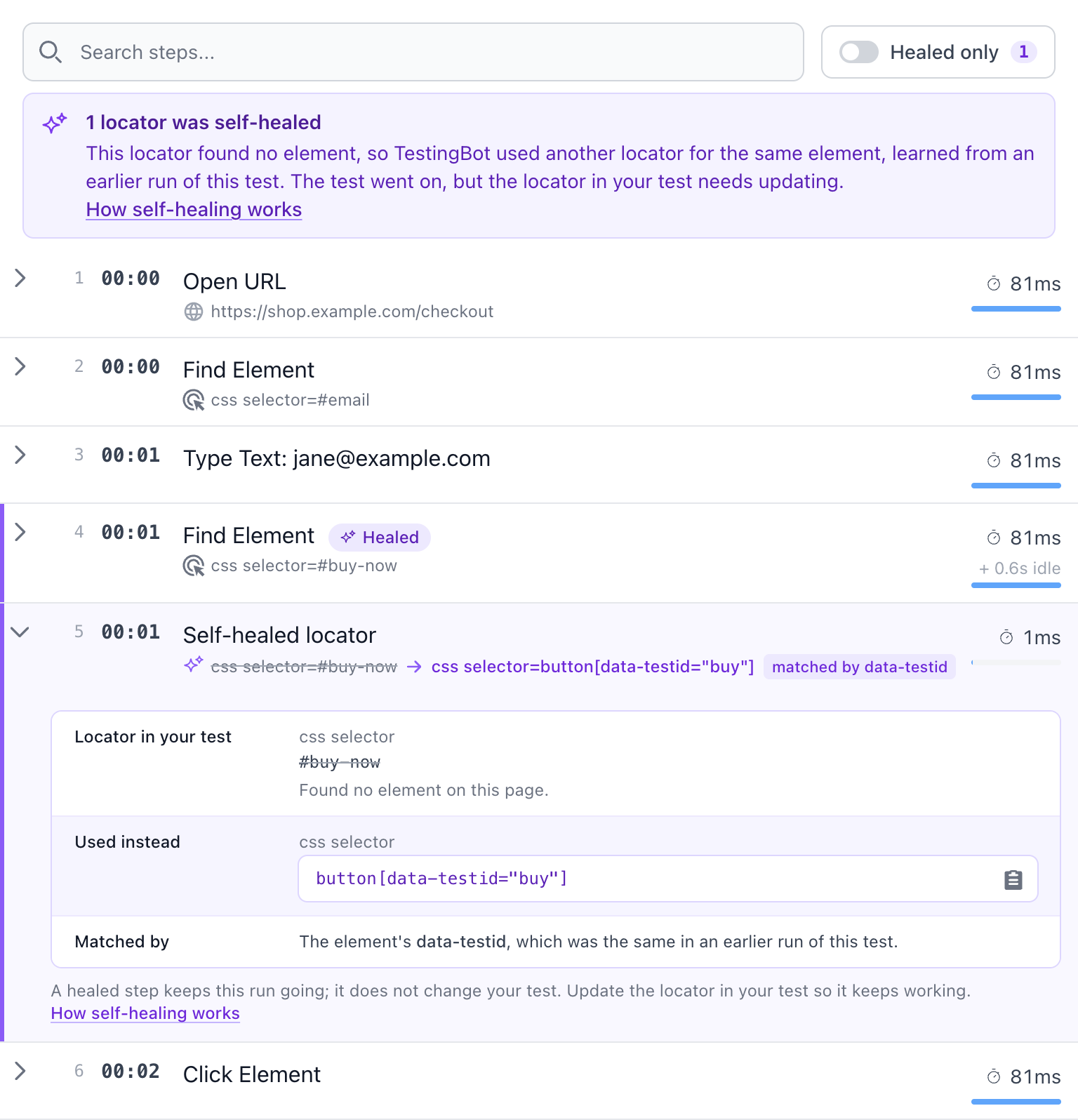
On the test's page, the Steps list shows every locator that was healed, so you can see what happened and fix the locator in your test:
- The Find Element step whose locator found no element gets a Healed badge.
- The step after it, Self-healed locator, shows the locator from your test, the locator TestingBot used instead and what the two were matched by. Open the step to copy the new locator.
- A note above the list says how many locators were healed, and the Healed only switch shows just those steps.
In the lists of tests (the dashboard, a build, a day's runs) a test with healed locators has a violet chip with their number, so you can spot the tests whose locators need an update.
The REST API returns the same as self_heal, with healed and attempted.
The steps where your test switches self-healing off and on again are listed as well.
With recordLogs set to strip-parameters, a healed step is still marked but does not show the locators. With recordLogs set to false, no steps are recorded.
Limitations
- Only
findElementon the page is healed: notfindElements, and not a search inside another element. - Websites only: native app sessions are never healed.
- A locator is only healed after an earlier run of the same test name, with self-healing on, has found the element.
- A locator that the session itself already found is not healed, also not on another page of your site where it changed.
- Healing searches the frame your test has switched to, without waiting: if the element appears later, the original error is returned.
- A healed element is the best match TestingBot can find, not a guarantee: treat a healed step as a reminder to update your locator.
- Reading the element's properties adds one short script call to the first successful find of each locator in a session.
